More than a decade ago, Peak Design rethought the humble camera strap. This was a necessary development. When you buy a camera, manufacturers almost always toss in a chintzy, uninspired strap with their logo on it. These cheap straps have cheap mounting systems that make it hard to quickly remove the strap from the camera when you need to, like when you’re attaching your camera to a tripod or gimbal and you’d rather not have a dangling strap whacking you in the face.
Peak Design solved this with its Anchor Links system, small circular nubs you leave attached to camera eyelets that make detaching or even swapping straps easy. The quick-connect mechanism is now the de facto industry standard and has inspired countless copycats.
Now, Wandrd has outdone that design using magnets.
“We’re photographers ourselves, so we’re constantly ideating, tinkering, thinking of ways that things can be better,” Ryan Cope, Wandrd cofounder, tells WIRED. “A camera strap like this has been at the back of our minds for a while.”
Wandrd—known for its camera bags—launched its Magnetic Camera Strap system on Thursday. It features a circular anchor similar to Peak Design, called “Torus Links.” The anchors attach to your camera’s eyelets and are rated to carry up to 198 pounds—so unless you’re bench-pressing your camera, they’ll do the job. If the cord does start to wear down over time, you’ll first see yellow under the black fabric—a sign you should replace the Torus Link. If it’s red, you should stop using the link immediately—a warning system borrowed from Peak Design. (Wandrd offers a two-year warranty.)
Unlike Peak Design’s anchors, the Wandrd anchors look like donuts, with a hole in the middle. When you attach the strap, the embedded magnets guide the Torus Link into the strap’s CoreLock mechanism, which pinches into the hole to secure the camera body. The magnets make connecting a strap easier, and they keep the strap fastened to the anchor, but you can’t just pull the strap off like you’re pulling a MagSafe accessory on your phone. You’ll need to use the strap’s dual-pinch mechanism to remove it from the Torus Link, a design that’s more secure.
The Torus Link is the donut-shaped object that attaches to your camera. On the right is the Magnetic CoreLock at the end of the strap. Pinch the top and bottom of this mechanism and let the magnets guide the strap into the Torus Link.
A mere 63 light-years from Earth lurks an enormous structure that spans around 1,000 astronomical units — or 93 billion miles — with the evocative nickname of “Cat’s Tail.”
The structure, believed to be largely made of dust, is located in the Beta Pictoris star system, and was first directly observed by NASA’s James Webb Space Telescope in infrared light.
Now, thanks to new images taken by the Hubble Space Telescope, we get to the see the tail in visible light as well, revealing a bizarre tail-like protrusion sticking out of the plane of a gargantuan, disk-shaped accumulation of cosmic dust.
As detailed in an article published last month in The Astrophysical Journal Letters, a team led by researchers at the University of Arizona were intrigued to get a closer look at the structure using the Hubble.
“Oddly, this feature had previously only been seen with the James Webb Space Telescope, which detects infrared light, but remained invisible at shorter wavelengths, which has puzzled the community for a while,” said research lead and University of Arizona doctoral student Arin Avsar in a statement. “We think the Cat’s Tail has eluded our observations in visible light until now because of what it’s made of.”
“It consists almost entirely of we call organic refractory material, which is heavily carbon-based,” he added. “These long chains of carbon atoms absorb visible light, so they’re quite black.”
Scientists believe the Cat’s Tail is the result of large, Pluto-like planetary bodies colliding, sending huge amounts of dust scattering across huge distances. These collisions may have generated enough heat to turn carbon into vapor, before cooling the material down into fluffy and porous grains of dust.
For their research, Avsar and his colleagues combined both infrared and visible-light images to calculate the protrusion’s geometry in 3D.
“We find that instead of extending for 1,000 astronomical units behind the star, the Cat’s Tail may extend straight sideways relative to us, and there is no third dimension to it,” he explained. “It’s essentially in the same plane of the sky as the star and possibly extends a little bit behind it.”
The team also observed a strange warp in the dust halo shrouding Beta Pictoris, which they say could be the result of at least three known planets in the system exerting considerable gravitational influences.
The findings could give us insight into what our own solar system may have looked like just after its formation. Beta Pictoris is a mere 23 million years old, compared to our own system’s 4.6 billion years of age. Similar interactions may have even influenced the formation of our system’s planets as we know them today.
More on cosmic structures:Scientists Scan Gigantic Structure Hiding Behind Our Galaxy
“We put a lot of effort into trying to tell you when not to do something if it’s no longer in the spirit of the recipe,” says Camilla Velasquez, the general manager of NYT Cooking.
For its recommendations, the LLM looks at the recipe itself, the Times’ ingredient substitution guide, user comments, and then what it calls AI “drawing on our expertise,” in that order. Velasquez says the AI should be a helper, not the main act, noting, “You shouldn’t be chatting with it.”
She explains that when the Times built the AI functionality, recipe editors helped create the original rule set, then evaluated how it worked at the end.
When I ask what this means for the jobs of 60 editors, writers, video journalists, and other employees—the team that creates the recipes people use and curates the vibe readers relate to—Velasquez stresses that NYT Cooking has been “hiring more than ever” and that it has “zero intention of publishing fewer recipes.”
So far, she says people are mainly using it for ingredient and equipment substitutions, along with adjusting recipes for dietary needs. “Some people use the chatbot to scale, or they’ll scale to match an ingredient,” giving the example of someone who had only one cup of oil for a recipe that needed more.
As a food writer whose career has taken some substantial turns due to AI recently, I wouldn’t say I’ve been clamoring for this, but I find the Times’ measured approach works pretty well.
I started testing it out by making chicken and dumplings using a five-star Alison Roman recipe with more than 6,000 ratings. I asked the AI tool to swap out bone-in, skin-on chicken thighs for boneless, skinless breasts. It thought about it for a moment—”simmering” in AI Cooking patois—and then offered up “Chicken Breast and Dumplings,” with the “breast” in the title rendered in the red-orange color that indicates a modification. Just below the title, it said it was “Joseph’s version made with AI. Not tested or endorsed by the original recipe’s creators.” Along with those visible changes, I could also toggle back and forth between my version and the original.
The Weekly Notable Startup Funding Report takes us on a trip across various ecosystems in the US, highlighting some of the notable funding activity in the various markets that we track. The notable startup funding rounds for the week ending 11/7/26 featuring funding details for Larridin, Ocient, Finpilot, and twenty-one other deals representing $5.8B in new funding that you need to know about.
Applied Compute – $350.0M
San Francisco-based Applied Compute is an AI startup that builds custom AI models and Specific Intelligence solutions for enterprises. Founded by Linden Li, Rhythm Garg, and Yash Patil in 2025, Applied Compute has now raised a total of $510M in total equity funding and is backed by Abstract, Blackstone, Definition, Diffusion, Elad Gil, First Harmonic, Hanabi Capital, HubSpot Ventures, Kleiner Perkins, Layer Global, Lux Capital, Neo, Nova, NVIDIA, QuantumLight, Shopify Ventures, Swish Ventures, and Timeless.
Avanlee Care – $3.5M
Billings-based Avanlee Care: Caregiving Simplified. Founded by Avanlee Christine and Chris Monson in 2020, Avanlee Care has now raised a total of $8.5M in total equity funding and is backed by Black Economic Alliance Venture Fund, Chrysalis Ventures, Esther Dyson, and Fairbridge.
Betski – $15.0M
Panama-based Betski is a company that offers an online casino ownership platform. Founded by Alejandro Navarro and Carlos Navarro in 2022, Betski has now raised a total of $15.3M in total equity funding and is backed by Nimbus Capital.
CesiumAstro – $630.0M
Austin-based CesiumAstro develops satellite communication systems and spacecraft solutions for aerospace, commercial, and defense applications. Founded by Shey Sabripour in 2017, CesiumAstro has now raised a total of $1.1B in total equity funding and is backed by Airbus Ventures, Incharge Capital Partners, Insight Partners, Janus Henderson Investors, Magnetar Capital, NewSpace Capital, Sands Capital Ventures, Sumitomo Corporation of America, and Woven Capital.
Corridian – $38.0M
Boston-based Corridian develops ultra-large autonomous underwater vehicles (AUVs) for undersea military logistics. Founded by Greg Barrow, Kyle Arace, Mark Bodnar, and Mike Guay in 2025, Corridian has now raised a total of $38M in total equity funding and is backed by Balerion Space Ventures, Cameron McCord, DCVC, Harpoon, Jackson Moses, Marlinspike Capital, and Point72 Ventures.
Cowboy – $5.0M
New York-based Cowboy is an AI technology company that develops autonomous AI agents and tools to streamline business workflows. Founded by Chad DePue in 2025, Cowboy has now raised a total of $5M in total equity funding and is backed by Aashay Sanghvi, Anagram, Compound, Farnaz azmoodeh, Ian Lapham, James Smits, Kevin Kwok, Mats Olsen, Nebular, Semantic Ventures, Shine Capital, and Uncommon Projects.
Finpilot – $10.0M
Seattle-based Finpilot uses artificial intelligence to explore publicly available corporate files and respond to research requests in natural language. Founded by John Alberg and Lakshay Chauhan in 2023, Finpilot has now raised a total of $14.5M in total equity funding and is backed by lobby capital and Madrona.
Firmly.ai – $15.0M
Seattle-based Firmly.ai is agentic commerce platform enabling seamless product discovery and checkout across AI and digital channels. Founded by damien Balsan, Murali Krishnamurthy, and Senthil Kumar in 2019, Firmly.ai has now raised a total of $17M in total equity funding and is backed by Alumni Ventures, ARK Investment Management, Benhamou Global Ventures, Granada Funds, Hike Ventures, JP Morgan, Mastercard, Samsung NEXT, Squarepoint Capital, The Mercantile Companies, and Versus Ventures.
Harbinger – $240.0M
Garden Grove-based Harbinger develops electric and hybrid commercial vehicles for medium-duty applications. Founded by John Harris, Phillip Weicker, and William Eberts in 2021, Harbinger has now raised a total of $597.7M in total equity funding and is backed by ArcTern Ventures, Australian Gulf Capital, BuildGroup, Capricorn Investment Group, FedEx, Fidelity, Greycroft, Leitmotif, Maniv Mobility, Panacea VC, Ridgeline, Squarepoint Capital, TechNexus Venture Collaborative, Tiger Global Management, and Xantium.
Journify – $12.0M
San Francisco-based Journify is a Composobale Customer Data Platform. Founded by Amine Chouki, Omar AlShoubaki, and Taoufik El Jamali in 2022, Journify has now raised a total of $17M in total equity funding and is backed by Al Mada Ventures, Bunat Ventures, Du Ventures, Oraseya Capital, Shorooq Partners, and Silicon Badia.
Kalepa – $75.0M
New York-based Kalepa develops AI-powered software solutions for the insurance industry, focusing on commercial insurance underwriting and risk assessment. Founded by Daniel Hillman and Paul Monasterio in 2018, Kalepa has now raised a total of $89M in total equity funding and is backed by IA Ventures, Inspired Capital Partners, and Updata Partners.
Larridin – $30.0M
San Francisco-based Larridin develops an AI analytics platform that measures adoption, spending, productivity, and business impact. Founded by Ameya Kanitkar, Jim Larrison, and Russell Fradin in 2024, Larridin has now raised a total of $47M in total equity funding and is backed by Alumni Ventures, Andreessen Horowitz, Cougar Capital Management, DG Daiwa Ventures, GFT Ventures, Gradient, Pelion Venture Partners, Thayer Investment Partners, and W23.
Lazarus AI – $43.0M
Boston-based Lazarus builds AI systems that help people solve the world’s toughest problems. Founded by Anish Patel and Ariel Elizarov in 2017, Lazarus AI has now raised a total of $49M in total equity funding and is backed by Allegis Capital, AngelList, Indelible, Joyance Partners, Motivate Venture Capital, Mucker Capital, One Way Ventures, Plug and Play, QBE Ventures, State Farm Ventures, Techstars, and Wave Function.
Northwood Space – $375.0M
Los Angeles-based Northwood Space designs ground infrastructure for spacecraft communication and data handling with deployable systems for connectivity. Founded by Bridgit Mendler, Griffin Cleverly, and Shaurya Luthra in 2023, Northwood Space has now raised a total of $536.2M in total equity funding and is backed by Alpine Space Ventures, Andreessen Horowitz, DFJ Growth, IQT, StepStone Group, and Washington Harbour Partners.
Numica – $21.0M
New York-based Numica provides accounting and tax services for companies and individuals. Founded by Slava Orekhov and Victor Lysenko in 2025, Numica has now raised a total of $21M in total equity funding and is backed by Flashpoint.
Ocient – $100.0M
Chicago-based Ocient is a hyper-scale data analytics company that allows organizations to unlock value by analyzing petabyte to exabyte scale data sets. Founded by Chris Gladwin, George Kondiles, and Joe Jablonski in 2016, Ocient has now raised a total of $256.5M in total equity funding and is backed by Blue Bear Capital, BOKA Capital, Buoyant Ventures, Dallas Venture Capital, Eron Wolf, Greycroft, IQT, OCA Ventures, Pritzker Group Venture Capital, and PSP Growth.
Ottonomy – $406.0M
Sunnyvale-based Ottonomy develops autonomous delivery robots and fleet management software for indoor and outdoor logistics operations. Founded by Ashish Gupta, Hardik Sharma, Pradyot KVN, and Ritukar Vijay in 2020, Ottonomy has now raised a total of $9.6M in total equity funding and is backed by Enrission India Capital.
RadianX – $9.0M
San Francisco-based RadianX is a technology company supplying perovskite-based solar modules. Founded by Josh Douglas and Vivian Qu in 2024, RadianX has now raised a total of $9M in total equity funding and is backed by Alumni Ventures, Avila VC, California Innovation Fund, One Small Planet, quantumEDGE Ventures, Riceberg Ventures, Sahsen Ventures, SOSV, and Twynam Agricultural Group.
Sentra – $150.0M
New York-based Sentra develops a data security platform that helps enterprises discover, classify, monitor, and protect sensitive information. Founded by Asaf Kochan, Ron Reiter, Yair Cohen, and Yoav Regev in 2021, Sentra has now raised a total of $253M in total equity funding and is backed by Bessemer Venture Partners, Capital One Ventures, Key 1 Capital, Munich Re Ventures, Standard Investments, and Zeev Ventures.
Shield AI – $2.0B
San Diego-based Shield AI is a deep-tech company that focuses on developing AI-powered systems to enhance the safety of service members and civilians. Founded by Andrew Reiter, Brandon Tseng, and Ryan Tseng in 2015, Shield AI has now raised a total of $5B in total equity funding and is backed by Advent International, Apandion, Blackstone, Center15 Capital, Disruptive, InnovationX, JPMorganChase, and Snowpoint Ventures.
Syncere – $11.0M
Palo Alto-based Syncere develops intelligent home robotics that combine household automation with everyday furniture and lighting. Founded by Aaron Tan and Angus Fung in 2025, Syncere has now raised a total of $14.5M in total equity funding and is backed by a16z speedrun, Draper Associates, Physical World, SeaX Ventures, and sequel.
Traversal – $120.0M
New York-based Traversal offers an AI-powered platform for monitoring and resolving software infrastructure incidents. Founded by Ahmed Lone, Anish Agarwal, Raaz Dwivedi, and Raj Agrawal in 2023, Traversal has now raised a total of $173M in total equity funding and is backed by Amex Ventures, Battery Ventures, Khosla Ventures, Kleiner Perkins, Redpoint, and Sequoia Capital.
Tutor Intelligence – $75.0M
Watertown-based Tutor Intelligence develops AI-powered robots and automation solutions for industrial tasks. Founded by Alon Kosowsky-Sachs and Josh Gruenstein in 2021, Tutor Intelligence has now raised a total of $153.6M in total equity funding and is backed by Andreessen Horowitz, Neo, and Union Square Ventures.
Zipline International – $1.5B
South San Francisco-based Zipline International provides autonomous drone delivery and logistics services for healthcare, retail, and food industries. Founded by James Knight, Keenan Wyrobek, Keller Cliffton, and William Hetzler in 2011, Zipline International has now raised a total of $3.5B in total equity funding and is backed by ARK Investment Management, Fidelity, JP Morgan, Layer Global, Paradigm, Salesforce Ventures, Tiger Global Management, Uber, Valor Equity Partners, and WCM Investment Management.
In late 2020, after months of forcing employees back to the assembly line in the midst of a growing pandemic, Elon Musk decided he’d had enough of being held accountable by regulators in California — and moved to Texas.
“California has been winning for a long time, and I think they’re taking it for granted,” Musk said at the time. “Silicon Valley has too much influence in the world.”
The move, largely seen as a way to avoid regulatory hurdles, environmental laws, and progressive taxation, culminated in Musk moving the headquarters of both Tesla and SpaceX to the Lone Star state. South Texas is now home to SpaceX’s so-called “Starbase,” a massive and growing rocket development campus that has run run foul of both locals and federal regulators alike.
But now, after a historic landslide victory for Democrats this week, Musk’s decision to go all-in on Texas — not to mention the whopping $474 million he spent on supporting Republican nominees nationwide — is looking like a drastic misfire. Democrats swept Texas, with voters picking James Talarico as senator, Gina Hinojosa as governor, and Nathan Johnson as attorney general.
The stock market immediately punished Musk for the humiliating defeat, with shares of both Tesla and Texas plummeting as soon as the market opened on Wednesday.
The election results could also throw a major wrench in Musk’s sizable AI investments and data center construction efforts. One of the biggest winners of late Tuesday’s victory were opponents of data center development, setting the stage for more moratoriums. In fact, Hinojosa has already called for one, as well as an end to tax breaks for the industry.
While it’s a win for countless Americans who have opposed the facilities, billionaires like Musk could be faced with a major headache.
“There is no way to sugarcoat that Democrats taking control especially over the Senate will create some major hurdles for AI and tech legislation in the Beltway over the next two years,” Musk loyalist and tech analyst Dan Ives said in a note on Wednesday morning.
A sulking Musk is already looking to move on from the humiliation, actively distancing himself from the major data center push.
“Data centers in space looking pretty appealing right now,” he tweeted after many hours of uncharacteristic silence, referring to SpaceX’s plans to develop orbital data centers.
“Guess my election-interfering space lasers didn’t work this time,” he added in a separate post.
As much as he might joke, the richest people in the world could soon be held accountable.
“We must get big money out of our politics, so no billionaire or trillionaire can buy our elections,” Talarico said during his victory speech.
More on Musk:AI Billionaires Are Flooding Money Into Politics to Influence Elections, But It’s Backfiring
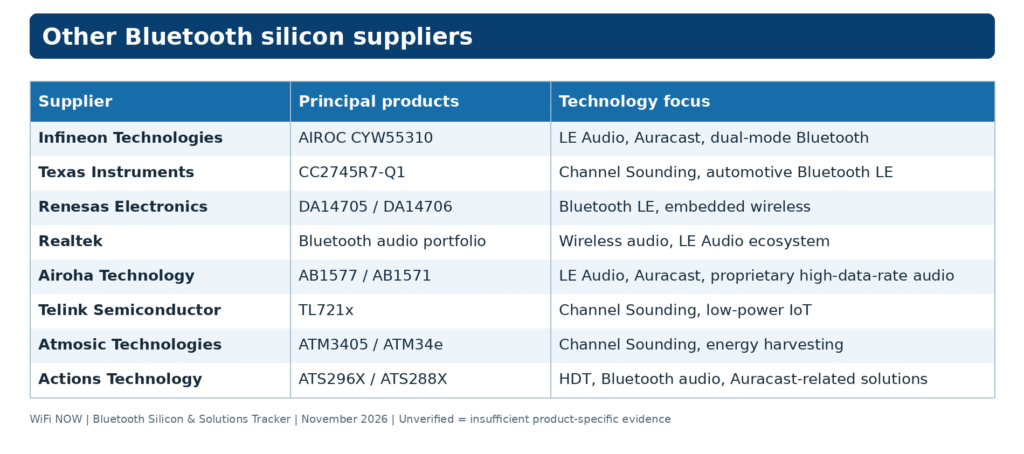
The adoption of Bluetooth Core 7.0 in November 2026 introduces HDT with physical layer data rates of up to 7.5 Mbps, compared with the previous Bluetooth LE maximum of 2 Mbps. The new specification establishes a foundation for high-resolution and lossless audio, spatial computing, connected devices and industrial applications. Semiconductor suppliers are responding with new Bluetooth chipsets, wireless microcontrollers, integrated connectivity platforms and licensable IP. Some solutions are commercially available, while others remain in development or are progressing towards commercialisation. This WiFi NOW tracker identifies the leading suppliers and their products, focusing on four technologies:
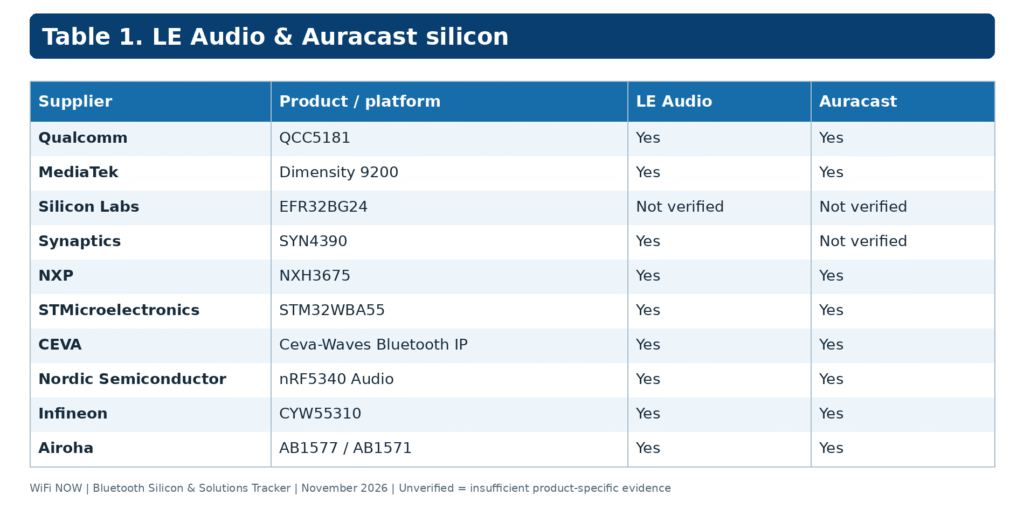
LE Audio: Next-generation Bluetooth audio using LC3 and isochronous communications.
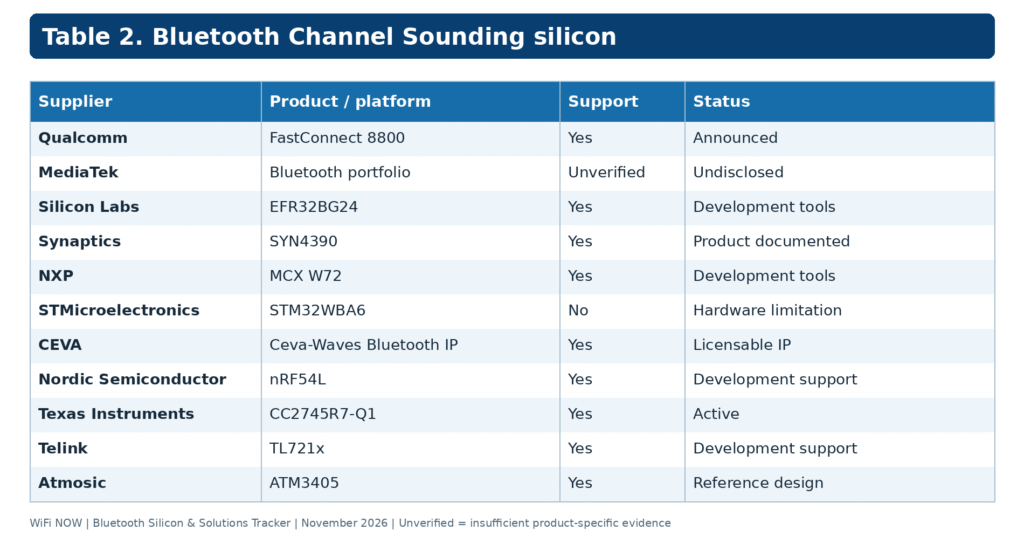
Channel Sounding: Secure distance measurement using Bluetooth 6.x technology.
High Data Throughput (HDT): Bluetooth Core 7.0 technology supporting PHY rates of up to 7.5 Mbps.
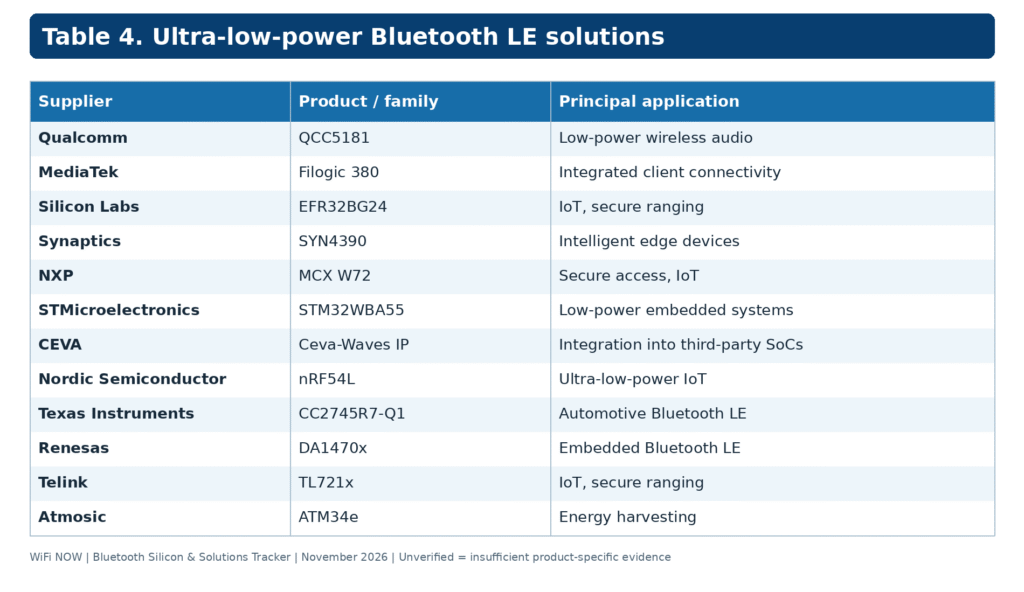
The tracker also covers conventional Bluetooth LE and ultra-low-power wireless solutions. All capabilities are assessed against publicly available manufacturer documentation. Support for a particular Bluetooth Core version does not automatically establish support for every optional feature. Technical reference: Bluetooth Core 7.0 Feature Overview – Bluetooth SIG
2. Global Bluetooth silicon suppliers
Qualcomm
Qualcomm supplies Bluetooth audio and wireless connectivity platforms for mobile devices, earbuds, headphones and integrated wireless systems. The QCC5181 supports LE Audio and Auracast alongside Snapdragon Sound technologies. Qualcomm’s FastConnect 8800 integrates Wi-Fi 8, Bluetooth, UWB and Thread, with announced support for Bluetooth Channel Sounding and HDT. Products: QCC5181, FastConnect 8800. Technology coverage: LE Audio, Auracast, Channel Sounding, HDT.
MediaTek
MediaTek provides Bluetooth connectivity across smartphones, multimedia devices and integrated wireless platforms. The Dimensity 9200 supports LE Audio and Auracast. The Filogic 380 combines Wi-Fi 7 with Bluetooth connectivity and includes manufacturer-described HDT support. Conformance of that earlier HDT implementation with the final Bluetooth Core 7.0 specification remains unverified. Products: Dimensity 9200, Filogic 380. Technology coverage: LE Audio, Auracast, Bluetooth LE, manufacturer-described HDT.
Silicon Labs
Silicon Labs develops Bluetooth LE SoCs and modules for connected devices, industrial applications and low-power IoT. Its EFR32BG24 and BG24L platforms support Channel Sounding development, while the BG2B extends the company’s portfolio of ranging-capable Bluetooth devices. Silicon Labs provides development kits, SDK support and a distance estimation algorithm. Products: EFR32BG24, EFR32BG24L, EFR32BG2B. Technology coverage: Bluetooth LE, Channel Sounding, low-power IoT. Technical reference: Silicon Labs Channel Sounding.
Synaptics
Synaptics supplies wireless connectivity platforms for intelligent edge devices, embedded systems, and IoT. The SYN4390 combines Wi-Fi 7, Bluetooth 6.0, and IEEE 802.15.4 connectivity. Its published product brief explicitly confirms LE Audio and Bluetooth Channel Sounding distance measurement. The broader portfolio includes the SYN4384, SYN43711, SYN43756(E) and SYN43016. Products: SYN4390, SYN4384, SYN43711, SYN43756(E). Technology coverage: LE Audio, Channel Sounding, integrated wireless connectivity.
NXP Semiconductors
NXP Semiconductors provides Bluetooth audio and wireless microcontroller solutions for consumer, industrial, automotive and secure access applications. The NXH3675 is an active Bluetooth 5.3 LE Audio-certified chipset supporting Auracast, including transmitter and receiver applications. It also supports LC3, LC3plus and multi-stream audio. NXP’s MCX W72 and MCX W70 wireless MCU families address Bluetooth Channel Sounding and secure ranging. Products: NXH3675, MCX W72, MCX W70. Technology coverage: LE Audio, Auracast, Channel Sounding, Bluetooth LE.
STMicroelectronics
STMicroelectronics develops Bluetooth LE wireless microcontrollers and embedded connectivity platforms. Its STM32WBA5x family supports LE Audio and Auracast, including software development for embedded audio applications. The STM32WBA6 supports Bluetooth LE 6.0 but does not support Channel Sounding because the required hardware is absent. ST has indicated that future devices will incorporate the feature. Products: STM32WBA55, STM32WBA6, STM32WB0. Technology coverage: LE Audio, Auracast, Bluetooth LE, embedded wireless connectivity. Technical reference: STMicroelectronics Channel Sounding clarification.
CEVA
CEVA provides licensable Bluetooth IP for integration into third-party semiconductor products. Its Ceva-Waves platform supports LE Audio, Auracast, Channel Sounding and HDT up to 7.5 Mbps. CEVA has disclosed more than ten HDT IP licensees, including for Actions Technology’s ATS296X audio chipset family. Products: Ceva-Waves Bluetooth IP. Technology coverage: LE Audio, Auracast, Channel Sounding, HDT.
Nordic Semiconductor
Nordic Semiconductor develops low-power wireless SoCs for IoT, wearables, audio and connected devices. The nRF5340 Audio platform supports LE Audio and Auracast, while the nRF54 family provides Channel Sounding capabilities. Nordic demonstrated prototype HDT silicon in October 2026 and is developing an HDT-capable SoC. Products: nRF5340 Audio, nRF54L, HDT prototype. Technology coverage: LE Audio, Auracast, Channel Sounding, HDT development. Technical reference: Nordic demonstrates HDT in silicon.
3. Bluetooth silicon technology comparison
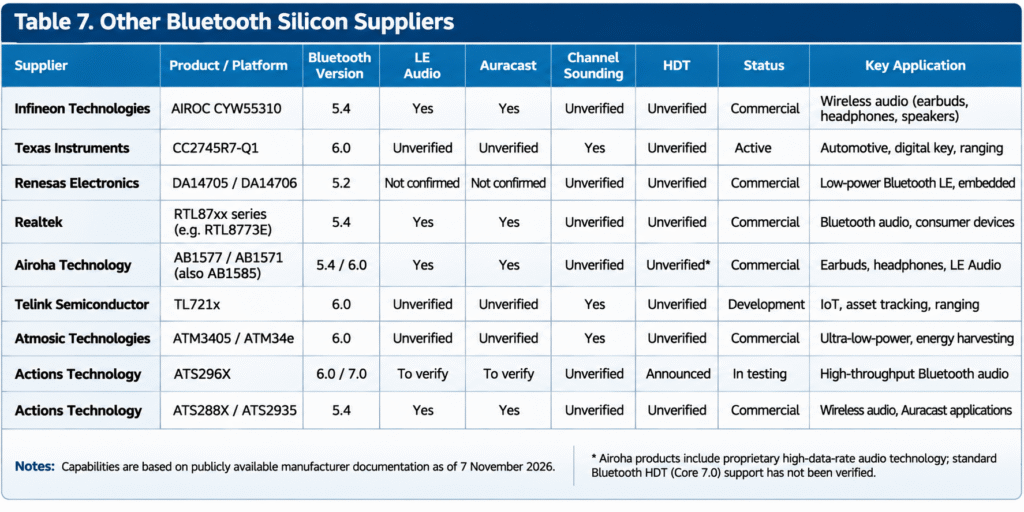
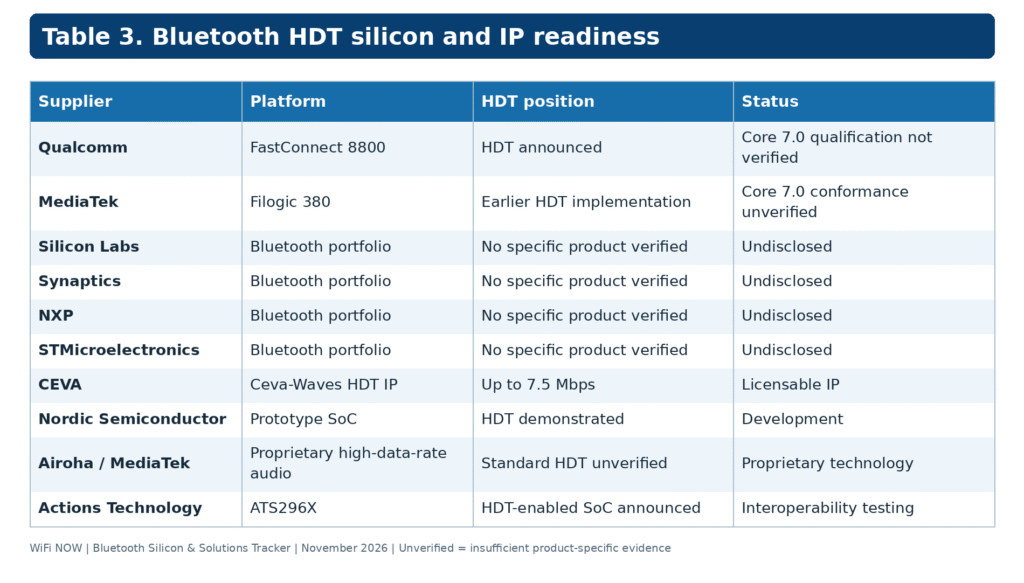
The following tables compare documented product capabilities. Features without sufficient product-specific evidence are marked as unverified.
4. Bluetooth HDT: The next generation
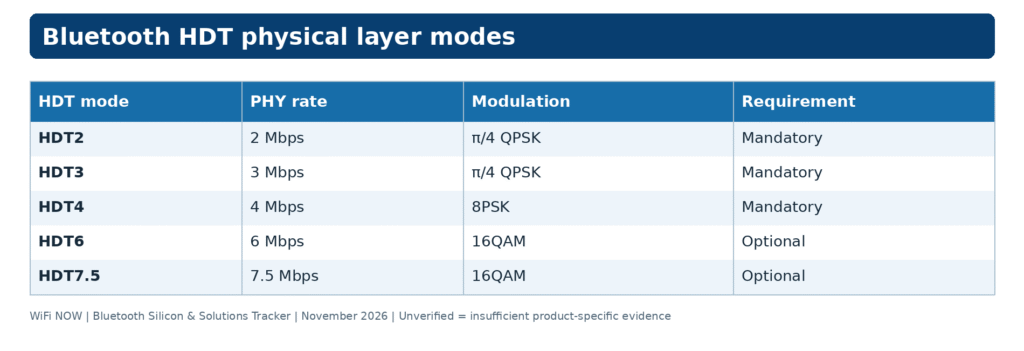
Bluetooth HDT introduces a new physical layer supporting substantially higher data rates while retaining the Bluetooth LE architecture. The Bluetooth Core 7.0 specification defines five HDT operating modes:
HDT7.5 requires HDT6 support. These figures represent PHY bit rates, not application throughput.
The Bluetooth SIG expects HDT to support standardised high-resolution and lossless wireless audio, with further applications in spatial computing, connected devices and industrial systems.
Semiconductor development is already under way. Qualcomm has announced HDT in FastConnect 8800, CEVA provides licensable HDT IP, Actions Technology has announced its ATS296X chipset family, and Nordic Semiconductor has demonstrated prototype silicon. Commercial availability and interoperability will depend on the release of compatible hardware, software stacks, qualification support and finished products.Technical reference: Bluetooth Core 7.0 Feature Overview.
5. Master Bluetooth Silicon & Solutions Tracker
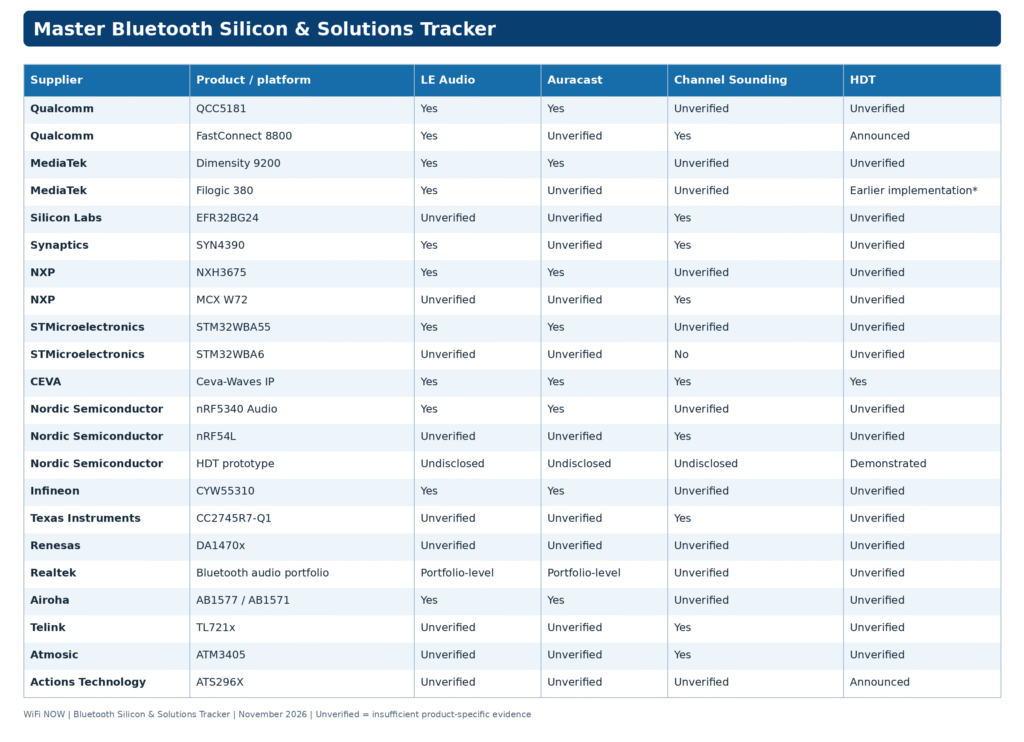
This consolidated matrix summarises the principal products and documented capabilities [click on image to enlarge].
MediaTek’s earlier HDT implementation has not been verified against the final Bluetooth Core 7.0 specification.
Product references are provided in the preceding technology tables.
6. Tracker methodology and updates
The WiFi NOW Bluetooth Silicon & Solutions Tracker is based on publicly available manufacturer documentation, product specifications, official announcements and Bluetooth qualification information. Products are assessed according to documented capabilities and commercial readiness. The tracker distinguishes between commercially available silicon, development platforms, announced products, licensable IP and prototype technologies.
An unverified entry indicates that sufficient public evidence has not been established. It does not necessarily mean that the feature is unsupported. Bluetooth qualification of a controller or chipset does not automatically establish qualification or interoperability of every finished product using that silicon. The tracker will be updated as suppliers introduce new Bluetooth products, publish technical documentation and announce support for emerging specifications.
Download all tracker information in Excel format
First edition: November 2026 Last reviewed: 7 November 2026 Next scheduled review: February 2027
Disclaimer: This tracker is based on publicly available manufacturer information as of November 2026. Product specifications, feature support and commercial availability may change. WiFi NOW makes reasonable efforts to ensure accuracy but cannot guarantee the completeness or correctness of all information. Unverified features should not be interpreted as unsupported.
Last month, Apple refreshed the 14-inch MacBook Pro with the latest M6 chip. It’s powerful, has great battery life, and the mini-LED screen is bright. There are all kinds of great attributes about this laptop, but you probably shouldn’t buy it. At least, not right now.
While the updated M6 is a perfectly capable laptop in its own right, it fits a bit awkwardly into the current lineup of MacBooks. It’s identical to the previous-gen M5 model, which came out in late 2025. But here’s the problem: Despite having the exact same laptop specs (save for the chip difference), you can currently get the M5 for $200 less on Amazon and Walmart.
If you’re thinking that upgrading from the M5 to the M6 must be worth $200, I’m not so sure. The M6 comes with two additional CPU and GPU cores, which is the origin of most of its gains. While that’s not nothing, it’s one of the smaller gen-over-gen Apple Silicon performance bumps in the past six years. The main difference is in AI performance, thanks to the second 16-core Neural Engine and faster memory bandwidth on the M6. In day-to-day work—or even in content creation workflows—I just don’t think the difference will be very noticeable between the two models. That’s especially true since the base 14-inch MacBook Pro isn’t a true pro laptop in terms of performance. It uses the same M5 chip that’s in the MacBook Air and iPad Pro, after all. The only other real difference is in wireless connectivity, where you get the bump to Wi-Fi 7 with the M6 model.
If you’re going to buy the 14-inch MacBook Pro M5, though, you should also be considering the 15-inch MacBook Air. The main difference between these two laptops is the quality of the display. The mini-LED panel on the MacBook Pro is much brighter and more colorful, allowing for some very impressive HDR performance. It also has more ports, such as HDMI and an SD card slot. My favorite small feature is its USB-C ports on both sides of the laptop, allowing for charging from either direction.
Apple
MacBook Air (M5, 2026)
The 15-inch MacBook Air is actually on sale today, too. The model with 16 GB of memory and a terabyte of storage is at its lowest price since June: $1,549. That’s $150 off Apple’s retail price.
So, whether you opt for the thinner 15-inch MacBook Air M5 or the 14-inch MacBook Pro M5 with its better screen, you have great deals to enjoy. The same just can’t be said as of now for the M6 MacBook Pro.
Power up with unlimited access to WIRED.Get best-in-class reporting and exclusive subscriber content that’s too important to ignore. Subscribe Today.
President Donald Trump spent Tuesday evening in disbelief as the walls of his carefully crafted alternate reality came crashing down around him.
On his social media echo chamber Truth Social, Trump took cheap shots at senators in his party who suffered humiliating defeats in Republican strongholds, lashed out at his allies at Fox News — going as far as to text one of its hosts in fury — and even vowed to become a “political pundit.”
Meanwhile, as he watched his personal picks fall one by one, what was left of his deserted social media platform crumbled to dust. Shares of Truth Social’s parent company, Trump Media & Technology Group (TMTG), crashed to an all-time low of just $5.23 Wednesday morning, after already spending much of the year circling the drain. After the initial publication of this story, they continued to slide, hitting another record low of just $5.06 — for a stomach-churning 61 percent lurch downward since the beginning of this year.
It’s yet another massive defeat for a company that has struggled to justify its own existence, let alone convince investors of pivots that have yet to pay off in any meaningful way. The company has attempted to reinvent itself several times, from major investments in Bitcoin and an attempted embrace prediction markets to an eyebrow-raising merger with a nuclear fusion company last year.
None of those efforts have shown any sign of life. And it’s core business is failing as well: recent analytics suggest that daily traffic on Truth Social has cratered by over 30 percent over the past year, compounding enormous losses quarter after quarter. It’s financial situation is a disaster as well, with the company reporting a staggering $238 million loss in the second quarter of this year — while earning less than $2 million over the same period.
Trump’s staggering loss in the midterms — an outcome widely seen as a major rebuke to him personally, despite not being on the ballot — is unlikely to save the company from its growing irrelevancy.
For now, the president will have to lick his wounds by complaining to the few MAGA stalwarts left on Truth Social — a sad predicament for a man who handily defeated his presidential opponent a mere two years ago.
More on Truth Social:Truth Social Stock Hits All-Time Low as Userbase Craters on Trump’s Twitter Clone
TL;DR: Pay $119.97 once for Office 2024 Home on one Mac or PC, including Word, Excel, PowerPoint, and OneNote through today.
$119.99
$149.99 Save $30.00
Your household budget has enough recurring expenses without the spreadsheet software joining in. Microsoft Office 2024 Home for Mac or PC is $119.97 (reg. $149.99) through Nov. 8, giving you four top desktop apps with one payment and no subscription fees.
It includes Word, Excel, PowerPoint, and OneNote. That covers school papers, household budgets, presentations, and the notes you absolutely meant to organize last week. For students and families who regularly use those tools, buying them once keeps the software expense predictable.
Word offers detailed formatting controls for turning a rough draft into a finished document. Excel’s Dynamic Arrays help manage changing information with functions such as FILTER, SORT, and UNIQUE. Instead of manually rebuilding a list when the underlying data changes, you can create formula-driven results that update with it.
The best tech deal this week
The Apple iPhone 18 Pro is free right now with T-Mobile
PowerPoint includes tools for recording presentations with voice and video, plus closed captions to make the material more accessible. OneNote rounds out the package with a place to collect notes for classes, projects, and personal planning.
The desktop apps also work offline, so a dropped connection doesn’t have to interrupt your writing or spreadsheet work. You can keep working on files stored locally without opening a browser.
Before purchasing, check the scope: each license covers one Mac or PC, and Outlook isn’t included. The license connects to your Microsoft account rather than the device itself.
Mashable Deals
By signing up, you agree to receive recurring automated SMS marketing messages from Mashable Deals at the number provided. Msg and data rates may apply. Up to 2 messages/day. Reply STOP to opt out, HELP for help. Consent is not a condition of purchase. See our Privacy Policy and Terms of Use.
Get Microsoft Office 2024 Home for just $119.97 through Nov. 8.
The headline number in the portable M.2 SSD enclosure market this fall is 80Gbps. OWC sells the Express 1M2 80G as a bus-powered USB4 80Gb/s enclosure that it rates at over 6,000MB/s with a compatible drive. Three rivals now fight it from below and beside: UGREEN’s 40Gbps cooling-fan case, Satechi’s USB4 Slim, and ULANZI’s DT580, which claims 80Gbps of its own.
This comparison, written on November 8, 2026, lines up the newest version of each product on spec sheets, claimed speeds and street prices. If you want the broader tier logic first, our earlier 40Gbps versus 80Gbps tier breakdown covers it. Here the focus is on named models, the listing conflicts that trip up buyers, and which M.2 SSD enclosure fits which laptop, console or camera workflow.
One caution up front. We did not run a lab bench for this piece, so every speed figure below is a vendor claim and says so. Where a price comes from a retailer instead of the maker, the text says that too. Where our research could not confirm a detail, we leave it out rather than guess.
Google · Preferred Sources
Don’t miss new tech stories on Google
Add Tech Insider once in the Google app and our stories appear in your news suggestions.
Add Now
Quick Verdict: Which Portable M.2 SSD Enclosure to Buy
Most buyers do not need 80Gbps. A USB4 40Gbps enclosure already outruns every USB 3.2 box on the market, and it costs far less than the new top tier. The 80Gbps cases only pay off when three things line up: a host that speaks 80Gbps, a PCIe 4.0 or newer drive, and files large enough to keep the link busy for more than a second or two.
Fastest claimed speed, best-known maker: OWC Express 1M2 80G. It carries an over 6,000MB/s claim and ships either as a bare DIY case or as a ready-to-run drive.
Best value at 40Gbps: UGREEN’s 40Gbps enclosure. The listing claims up to 3,600MB/s and includes a cooling fan, two cables and a silicone case.
Best for drive flexibility: Satechi USB4 Slim. It accepts all four common M.2 lengths and lists support for up to 8TB.
Highest claimed throughput on paper: ULANZI DT580 at roughly 6,500MB/s, but its listings contradict each other on interface and drive sizes. Read the buying notes before you order.
Cheapest way to reuse an old drive: a 10Gbps case such as the Sabrent EC-SNVE, which according to Sabrent’s own page takes both NVMe and SATA M.2 drives.
The verdict section near the end of this piece turns those picks into a decision tree with numbers. First, the background on why this market looks different from a year ago.
What Changed in 2026: The 80Gbps Tier Arrives
The practical ceiling for a bare M.2 SSD enclosure used to sit at 40Gbps. That ceiling has moved. OWC describes the Express 1M2 80G as an ultra-fast USB4 80Gb/s portable SSD, offered either as a DIY enclosure or a ready-to-run unit, with passive cooling and broad Thunderbolt and USB-C compatibility. OWC reportedly positions it as the step-up from its regular Express 1M2.
The rest of the field followed through the year. Satechi added a separately branded DotDisk 80Gbps enclosure that uses USB4 v2, takes one PCIe 4.0 NVMe drive, and carries a $199.99 price tag on a page updated October 29, 2026. UGREEN listed an 80Gbps M.2 enclosure with Thunderbolt 5, Thunderbolt 4 and USB4 support at €179.99 on October 31, 2026, down from €279.99. ULANZI’s DT580 is a single-drive enclosure for one 2280 NVMe SSD, which ULANZI describes as Thunderbolt 5 compatible with support up to 8TB.
Two points matter for shoppers. First, the 80Gbps cases are still new, so street prices swing widely from week to week. Second, the older 40Gbps designs have not gone away. UGREEN’s 40Gbps line remains an actively sold family, and Satechi’s 40Gbps USB4 Slim stays in its catalog. Our Thunderbolt 5 versus USB4 versus USB 3.2 comparison explains how the three link types differ in practice.
The Naming Mess You Should Know About
Enclosure makers recycle names across regions, and that causes real mistakes at checkout. UGREEN sells its 40Gbps case under at least three regional names, including a cooling-fan variant and a UK listing titled Hard Drive Enclosure with Cooling Fan and 2 Cables. Satechi split its generic USB4 enclosure into a Slim and a Pro. OWC sells both the regular Express 1M2 and the faster 80G, and its own comparison page separates the two.
The takeaway: check the interface speed in the listing body, not just the product title. A case called Express 1M2 without the 80G suffix is the slower sibling.
Specs Table: Four Portable M.2 Enclosures Side by Side
The table below uses only details confirmed on the makers’ own pages or in current listings as of November 8, 2026. Where a page does not state a detail, the cell says so. We left the Sabrent EC-SNVE out of the table because its price and listing details rest on a single source, and we cover it in the profiles instead.
Spec
OWC Express 1M2 80G
UGREEN 40Gbps
Satechi USB4 Slim
ULANZI DT580
Host interface
USB4 80Gb/s
USB4, up to 40Gbps
USB4, up to 40Gbps
80Gbps (Thunderbolt 5 per ULANZI)
Claimed throughput
Over 6,000MB/s
Up to 3,600MB/s read/write
Not stated on fetched page
About 6,500MB/s
M.2 sizes
2242, 2280
Not stated on fetched page
2230, 2242, 2260, 2280
2280 (single drive)
Capacity ceiling
8TB ready-to-run listed
Up to 8TB
Up to 8TB
Up to 8TB
Drive bays
One M.2 drive
One (dual-bay is a separate model)
One M.2 NVMe slot
One
Cooling
Passive cooling
Fan
Thermal management, no fan listed
Multilayer cooling
Format
DIY case or ready-to-run
DIY case
DIY case
DIY case
Behavior on 40Gbps hosts
Thunderbolt and USB-C compatible
Native 40Gbps
Thunderbolt 3 and 4 compatible
Drops to 40Gbps on Thunderbolt 4 and USB4
In the box
Strada licenses promo (90 days)
USB-C and USB-A cables, thermal pad, screwdriver, manual, silicone case
Not stated on fetched page
80Gbps cable, thermal pads, magnetic plate, screwdriver kit, pouch
Operating systems
Not stated on fetched page
Not stated on fetched page
macOS Sonoma 14.6 or later, Windows 11, Linux (Pro listing)
Windows and macOS
Status on Nov 8, 2026
Active
Active
Active
Active
Naming caveat
Do not confuse with regular Express 1M2
Several regional names
Slim and Pro variants
Listings disagree on interface
The table makes one split obvious. OWC and ULANZI sit in the 80Gbps class with claimed speeds near or above 6,000MB/s, while UGREEN and Satechi sit in the 40Gbps class. OWC’s own spec page adds a useful ceiling for context: it lists PCIe Gen 3.0 drives at up to 3,400MB/s and Gen 4.0 and Gen 5.0 drives at up to 6,800MB/s. A Gen 5 drive therefore gains nothing over Gen 4 inside that enclosure.
Drive-size support differs from case to case, so check which M.2 lengths a case accepts before you buy, especially if you want to move a drive out of a handheld. Our guide on how to install an NVMe SSD walks through the physical steps that apply to every case here.
Benchmarks: What Each Source Claims, and What the Math Allows
Independent test numbers for the newest 80Gbps cases were thin on November 8, 2026. What exists is three vendor pages that publish throughput claims, plus the raw link arithmetic that caps any of them. Treat the table as a ceiling chart, not a bench result.
Source
Product
Throughput claim
What it means
OWC product page and retail listing
Express 1M2 80G
Over 6,000MB/s real-world
Vendor claim with a PCIe 4.0 or newer drive
OWC spec sheet
Express 1M2 80G
3,400MB/s on Gen 3, 6,800MB/s on Gen 4 and Gen 5
Drive-dependent ceiling
ULANZI product copy
DT580
About 6,500MB/s
Vendor claim, 80Gbps cable required
ULANZI product copy
DT580
6GB file in one second
Marketing figure for the 80Gbps maximum
UGREEN product page
40Gbps enclosure
Up to 3,600MB/s read/write
Vendor claim, USB4 host required
Link arithmetic
Any 10Gbps case
1,250MB/s raw
Before protocol overhead
Link arithmetic
Any 40Gbps case
5,000MB/s raw
Before protocol overhead
Link arithmetic
Any 80Gbps case
10,000MB/s raw
Before protocol overhead
Read the table from the bottom up. A 40Gbps link carries 5,000MB/s raw, so UGREEN’s 3,600MB/s claim leaves roughly 28 percent on the table for protocol overhead and controller limits. That gap is normal for tunneled PCIe traffic. The 80Gbps cases claim 6,000 to 6,500MB/s out of a 10,000MB/s raw link, and in OWC’s case the drive itself, not the cable, sets the ceiling at 6,800MB/s.
That matters for buyers. If you pair an 80Gbps case with a Gen 4 drive, OWC’s own sheet allows up to 6800 MB/s, against the 3,600MB/s UGREEN claims for its case. Pair it with a Gen 3 drive and OWC’s own sheet caps you at 3,400MB/s, which is below what the 40Gbps UGREEN promises. Spending on the fast case before the fast drive wastes money.
Pricing Table: What These Enclosures Cost in November 2026
Prices below come from the makers’ pages or from dated retailer listings, and each row names its source type. They span four currencies because the makers price by region. Do not compare the numbers across rows without converting. Enclosure prices exclude the SSD itself, which is the larger bill for most builds, as our enclosure versus prebuilt cost analysis shows.
Product
Class
Price
Date and source
OWC Express 1M2 80G (enclosure)
80Gbps
Not listed
Not listed
Satechi DotDisk 80Gbps
80Gbps
$199.99
Satechi page updated Oct 29, 2026
UGREEN 80Gbps M.2 enclosure
80Gbps
€179.99 (was €279.99)
Oct 31, 2026, UGREEN listing
ULANZI DT580
80Gbps
RM699.00
Oct 30, 2026, Malaysian retailer
ULANZI DT580
80Gbps
About AED831.98
Nov 2, 2026, Amazon UAE
UGREEN 40Gbps (single-bay)
40Gbps
€79.99 (was €99.99)
UGREEN EU listing
UGREEN 40Gbps dual-bay
40Gbps
£99.72
UGREEN UK listing, two NVMe slots
Several other prices appear in single listings, so treat them as hints rather than fixed prices. Amazon reportedly listed the OWC 80G at $199.99 on November 4, down from $219. Best Buy reportedly listed the 1TB ready-to-run version at $489 in the first week of November. UGREEN’s European store reportedly shows its 40Gbps case at €64.99 against a €89.99 list price, and its UK store reportedly lists £59.97. Satechi’s U.S. site reportedly lists the Slim at $119.99. ULANZI’s Amazon store reportedly lists the DT580 at $284.99.
Put differently, the street spread inside the 80Gbps tier is wide. The OWC promo price, the Satechi price and the reported Amazon price for the DT580 span more than $100 for products with similar headline claims. In the 40Gbps tier the spread is tighter, and sale events pull several of those cases close to half the price of an 80Gbps unit.
Product Profiles: What Each Enclosure Does Well and Badly
OWC Express 1M2 80G
OWC’s case is the safe pick in the 80Gbps class because the vendor documents it clearly and sells it two ways. You can buy the empty enclosure, or buy a ready-to-run unit with a drive inside. A 1TB ready-to-run model carries part number OWCUS4V2EXP1MT01, and Best Buy lists an 8TB ready-to-run version as well. Current listings support 2242 and 2280 drives, which rules out the short 2230 drives used in handhelds.
The weak spot is price and the 2230 gap. Buyers who want one case for a Steam Deck drive and a desktop drive will need a different enclosure. For a deeper look at how OWC’s design stacks up against Sabrent’s, read our Thunderbolt 5 SSD comparison.
UGREEN 40Gbps M.2 NVMe SSD Enclosure
UGREEN’s case is the value anchor of this group. The UK product page describes a USB4 enclosure with a cooling fan, and the box includes USB-C and USB-A cables, a thermal pad, a screwdriver, a manual and an external silicone case. The claim is up to 3,600MB/s. UGREEN lists the product as active, with no successor announced, and it also sells a dual-bay 40Gbps model with two NVMe slots and one-key cloning.
The drawbacks are fan noise potential and naming confusion across regional stores. The fan keeps sustained transfers cooler, but a bus-powered fan adds load on a laptop battery. If you reuse an old drive, see how it compares against Sabrent and others in our four-brand NVMe enclosure test round-up.
Satechi USB4 Slim and Pro
Satechi’s USB4 Slim NVMe SSD Enclosure supports USB4 at up to 40Gbps, one M.2 NVMe slot, drives up to 8TB, and all four common lengths from 2230 to 2280. It also lists Thunderbolt 3 and 4 compatibility and advanced thermal management. The Pro variant is described in marketplace results as supporting up to 16TB, which no other case in this group matches. Satechi’s official Apple-focused compatibility lists name 2026 MacBook Pro M5 Pro and M5 Max models and the MacBook Air M5.
The 80Gbps option from Satechi is a different product. The DotDisk 80Gbps enclosure uses USB4 v2 and takes one PCIe 4.0 drive, and Satechi sells it as its own tier at $199.99. Do not confuse the Slim with the DotDisk when you read reviews.
ULANZI DT580
The DT580 is the case with the loudest conflict between listings. ULANZI’s own November 7 article describes a single 2280 NVMe enclosure with support for up to 8TB, Thunderbolt 5 compatibility and backward compatibility with Thunderbolt 4 and USB4. Retail listings, by contrast, call it USB4 v2 and claim support for 2230, 2242, 2260 and 2280 drives. Where listings disagree, trust the maker’s page and confirm the drive length before you buy.
Remember the fallback too. ULANZI’s own material says Thunderbolt 4 and USB4 hosts run the case at 40Gbps, so the claimed 6,500MB/s needs a host that offers 80Gbps. The box includes an 80Gbps cable, thermal pads, a magnetic adapter plate, a screwdriver kit and a pouch.
Sabrent EC-SNVE (10Gbps Baseline)
Sabrent’s EC-SNVE stays on sale as a USB 3.2 Type-C tool-free case for both PCIe NVMe and SATA M.2 drives in 2230, 2242, 2260 and 2280 sizes. Sabrent’s page reportedly lists a $29.95 sale price against a $35.94 regular price, and the page was updated November 6, 2026. It is a 10Gbps product, so it tops out near 1,250MB/s raw. It makes sense as a backup tool or a cheap way to read an old drive, and not as a fast workflow case.
Use-Case Recommendations: Match the Enclosure to the Job
The right portable M.2 SSD enclosure depends less on a ranking and more on what you move, how often, and on which machine. These six recommendations cover the most common jobs we see readers ask about.
Mac video editor with a 2026 MacBook Pro: choose the OWC Express 1M2 80G if your Mac has 80Gbps-capable ports, and pair it with a PCIe 4.0 drive. Satechi’s compatibility lists name the M5 Pro and M5 Max MacBook Pro generation, but the Slim is a 40Gbps product, so it caps below the OWC.
Windows gamer expanding a game library: the UGREEN 40Gbps case is enough. Game loads rarely push a link past 3,000MB/s, and the money you save buys more drive capacity.
Handheld owner moving a short drive: choose the Satechi USB4 Slim, because it lists 2230 support. OWC’s current listings name 2242 and 2280 only, and ULANZI’s own page names a single 2280 drive.
Photographer or videographer in the field: choose a bus-powered case with a pouch and a short cable. The ULANZI box includes a pouch and a magnetic plate, which suits camera rigs. ULANZI also sells itself to camera users in its blog content.
Anyone reusing an old drive: a 10Gbps case such as the Sabrent EC-SNVE is the cheapest route, and it handles SATA M.2 drives too.
Phone shooter offloading ProRes or 4K clips: match the case to the phone’s port speed first. Our iPhone external SSD guide explains why a 10Gbps magnetic case often fits better than a fast USB4 drive.
A seventh case deserves a mention. If you plan to move between hosts all the time, such as a Windows desktop, a Mac laptop and a console, buy for the slowest host you use. Our breakdown of built-in-cable M.2 enclosures shows where the 10, 20 and 40Gbps tiers each make sense for that kind of mixed use.
Real-World Scenarios: What the Claimed Speeds Mean in Minutes
Spec sheets are abstract, so here are six worked scenarios. Each one divides the data size by a claimed rate, which gives a best-case time. Real transfers run slower once a drive’s cache fills or the case heats up. Use the numbers for comparing cases, not for promising a deadline.
Scenario
Data size
At 6,000MB/s (OWC claim)
At 3,600MB/s (UGREEN claim)
At 1,250MB/s (10Gbps raw)
Offload 100 clips of 4K footage at 1.5GB each
150GB
25 seconds
42 seconds
2 minutes
Move a 1TB game library
1TB
2 minutes 47 seconds
4 minutes 38 seconds
13 minutes 20 seconds
Dump a 500GB wedding shoot
500GB
1 minute 23 seconds
2 minutes 19 seconds
6 minutes 40 seconds
Back up a 2TB laptop
2TB
5 minutes 33 seconds
9 minutes 16 seconds
26 minutes 40 seconds
Fill an 8TB drive
8TB
22 minutes 13 seconds
37 minutes 2 seconds
1 hour 46 minutes
Clone a 256GB handheld drive
256GB
43 seconds
1 minute 11 seconds
3 minutes 25 seconds
The pattern is clear. For small jobs under about 200GB, the gap between 3,600MB/s and 6,000MB/s is under a minute, and most people will not care. For jobs above 1TB, the gap grows into minutes, and for 8TB fills it reaches about 15 minutes. That is the only place the 80Gbps premium turns into saved time a busy editor would notice.
ULANZI’s own copy gives a useful sizing anchor. It says an 8TB drive holds about 5,400 clips of 1.5GB 4K video, about 2.78 million 3MB photos, or about 8.38 million 1MB documents. Those are vendor figures, but the arithmetic holds: 5,400 clips at 1.5GB each add up to roughly 8.1TB.
Why Real Transfers Run Slower Than the Table
Three things pull results below the best case. Small files cost more per megabyte than large ones, because each file adds overhead. Consumer NVMe drives write fast into a cache and then slow sharply once it fills. And a hot controller throttles itself to stay safe. The third point is the one enclosures can fix, which leads to the next section.
Heat, Power and Cables: The Hidden Variables
Cooling separates these cases more than headline speed does. OWC relies on passive cooling, UGREEN adds a fan, and ULANZI lists multilayer cooling with thermal silicone pads. Satechi describes advanced thermal management without naming a fan. Passive designs stay silent and need no extra power, but they leave less margin during long writes. Our earlier piece on portable NVMe heat and throttling shows how quickly a bare drive in a small case heats up under sustained load.
Power draw matters on a laptop. These cases run on bus power, which means the host port feeds both the controller and the drive. A fast PCIe 4.0 drive pulls noticeably more than a budget Gen 3 drive, and a fan adds a little more. On a laptop running on battery, a long backup can cost a visible slice of charge.
Cables are the quiet failure point. An 80Gbps link needs a cable certified for it. ULANZI ships one in the box, and a cheap USB-C charging cable will fall back to far lower speeds without warning. If your new case benchmarks at a quarter of its claim, swap the cable before you blame the enclosure.
Host Compatibility Checklist
The enclosure only runs as fast as the slowest link in the chain. ULANZI’s own material confirms that Thunderbolt 4 and USB4 hosts run its 80Gbps case at 40Gbps. The same logic applies to every case here, so use this table to estimate your ceiling before you pay for the faster tier.
Your host port
Link ceiling
Raw rate
Best match
USB 3.2 Gen 2 (10Gbps)
10Gbps
1,250MB/s
Any case, cheapest wins
USB 3.2 Gen 2×2 (20Gbps)
20Gbps
2,500MB/s
Any 40Gbps case, run at host limit
USB4 or Thunderbolt 4 (40Gbps)
40Gbps
5,000MB/s
UGREEN 40Gbps or Satechi Slim
Thunderbolt 5 or USB4 v2 (80Gbps)
80Gbps
10,000MB/s
OWC Express 1M2 80G or ULANZI DT580
Check your own machine before you shop. On Windows, the Thunderbolt or USB4 label sits next to the port or in the laptop’s spec page. On a Mac, System Information lists the Thunderbolt or USB bus speed. If your host only offers 40Gbps, save the money and buy the 40Gbps case.
Buyer’s Checklist: Reading an Enclosure Listing Before You Pay
Enclosure listings are some of the messiest product pages in PC hardware. The same box appears under different names, specs get copied from sibling models, and speed claims often describe the best case with the best drive. A short checklist saves returns.
Find the interface line first. Look for USB4 40Gbps, USB4 v2 80Gbps or Thunderbolt 5. If the title says only USB-C, assume 10Gbps until the body proves otherwise.
Read the drive lengths. Short 2230 drives need explicit support. The ULANZI DT580 shows why: the maker names one 2280 slot while some retail pages list four lengths.
Check what ships in the box. UGREEN lists two cables, a thermal pad, a screwdriver and a silicone case. ULANZI lists an 80Gbps cable, pads, a magnetic plate, a screwdriver kit and a pouch. A case with no 80Gbps cable forces a second purchase.
Note whether the drive is included. OWC sells the Express 1M2 80G both as an empty case and as a ready-to-run unit, and the two share a product line but not a price.
Look at the price history. OWC priced the 80G enclosure at $169.99 during its October 1 Prime Big Deal Days promo, and a reported Amazon price on November 4 sat at $199.99. A gap that wide inside five weeks tells you to wait for a sale.
Check the region. UGREEN’s European listings reportedly range from €59.99 in Spain to €79.99 elsewhere on the same case, and its UK store uses pounds. Buy from the store that ships to you, not the cheapest foreign page.
Confirm software extras. OWC’s page advertises two Strada licenses for 90 days, a $180 value, with purchase. That helps video editors and means nothing to everyone else.
Timing also matters this month. UGREEN was already promoting Black Friday early access with discounts of up to 40 percent, according to its own page. Enclosures are small, light and easy to discount, so expect more cuts through late November. If you do not need the case this week, set a price alert and wait.
Warranty and Return Notes
We could not confirm warranty terms for any of these cases from the research behind this piece, so we will not quote them. Read the warranty line on the seller page before you order, and keep the packaging for the first thirty days. A bad cable or a weak port often looks like a dead enclosure, and a clean return path lets you test the case on a second machine without risk.
Migration Guide: Moving From a 10Gbps Case to USB4 or 80Gbps
Swapping enclosures takes about ten minutes, but a few steps prevent data loss and speed surprises. This walkthrough assumes you already own an NVMe drive in an older case and want to move it into a faster one. For more hardware walkthroughs, see our hardware coverage.
Check the drive generation. A Gen 3 drive tops out near 3,400MB/s inside OWC’s case, so it will not justify an 80Gbps upgrade.
Back up the contents. Copy anything irreplaceable to a second location before you open any case.
Eject the drive cleanly. Use the operating system’s eject option, then unplug the old case.
Remove the drive. Most of these cases open without tools or with the small screwdriver supplied in the box.
Match the length. Confirm your drive is a 2280, 2242, 2260 or 2230, then check that your new case lists that length.
Fit the thermal pad. UGREEN and ULANZI both ship pads. Peel the film and seat the pad between the drive and the case wall.
Close the case and connect the supplied cable. Do not reuse an old charging cable for an 80Gbps link.
Plug into the fastest port. Look for the Thunderbolt or USB4 mark, not just a USB-C shape.
Verify the link and run a speed test. Use the commands below, then compare the result to the claimed rate for your host.
Watch temperature for ten minutes. Copy a large folder and check the drive temperature at the end.
# Linux: confirm the drive appears and read its temperature
lsblk -o NAME,SIZE,MODEL,TRAN
sudo nvme smart-log /dev/nvme1 | grep -i temperature

# Linux: sequential read test, 30 seconds, read-only
sudo fio --name=seqread --filename=/dev/nvme1n1 --rw=read --bs=1M \
  --iodepth=8 --direct=1 --runtime=30 --time_based --readonly

# macOS: check the negotiated Thunderbolt or USB4 link speed
system_profiler SPThunderboltDataType | grep -i speed
system_profiler SPNVMeDataType
On Windows, CrystalDiskMark gives a similar sequential read figure, and Device Manager shows whether the drive sits behind a USB4 or Thunderbolt controller. If the result lands far below the claim, check the cable first, the port second, and the drive generation third. A result near 1,000MB/s on a 40Gbps case usually means the link negotiated down to 10Gbps.
Common Migration Mistakes
Buyers repeat the same errors. They install a SATA M.2 drive in an NVMe-only case, and the drive never appears. They plug an 80Gbps case into a 40Gbps port and think the case is faulty. They skip the thermal pad, which raises temperatures during long copies. And they buy the DT580 for a 2230 drive without checking that ULANZI’s own page names a single 2280 slot.
Pros and Cons of Each Portable M.2 Enclosure
Enclosure
Pros
Cons
OWC Express 1M2 80G
Over 6,000MB/s claim, DIY or ready-to-run, clear documentation, passive cooling with no fan noise
Lists 2242 and 2280 only, highest price in the group at promo and street levels
UGREEN 40Gbps
Fan cooling, full accessory kit with two cables and a silicone case, a dual-bay sibling exists
Claimed 3,600MB/s ceiling, several regional product names
Satechi USB4 Slim
All four M.2 lengths, 8TB ceiling, Thunderbolt 3 and 4 compatible
40Gbps only, no throughput claim on the fetched page
Satechi DotDisk 80Gbps
USB4 v2 at up to 80Gbps with a PCIe 4.0 drive
$199.99 price tag, separate product that buyers confuse with the Slim
ULANZI DT580
Claimed 6,500MB/s, 80Gbps cable and pouch in the box, magnetic plate
Single 2280 slot per the maker, listings disagree on interface and drive lengths
The table hides a trade-off worth stating plainly. The 80Gbps cases in the group cost noticeably more than the 40Gbps cases on the prices above, while the speed you actually get depends on the drive you pair with them. That is why many readers should stop at 40Gbps. Our NVMe enclosure tier value breakdown tests the same question across all four speed classes.
Verdict: Our Data-Based Pick for Each Buyer
Here is the cost per claimed megabyte per second, using only the figures verified above. OWC’s $169.99 promo price divided by its 6,000MB/s claim works out to about 2.8 US cents per MB/s. UGREEN’s €79.99 EU price divided by its 3,600MB/s claim comes to about 2.2 euro cents per MB/s. The currencies differ, so read this as a rough guide and not an exact ranking. It still shows that the 80Gbps premium is smaller than the sticker gap suggests, as long as you can use the extra speed.
Buy the OWC Express 1M2 80G if your laptop has an 80Gbps port, you move 1TB or more at a time, and you will pair it with a PCIe 4.0 drive.
Buy the UGREEN 40Gbps case if you have a USB4 or Thunderbolt 4 port and want the best price for speed. It is our default pick for most readers.
Buy the Satechi USB4 Slim if you need to move a 2230 drive or want one case for several drive lengths.
Consider the ULANZI DT580 only after confirming the interface and drive length on ULANZI’s own page. The claim is the highest on paper, but the listings are the least consistent.
Buy a 10Gbps case if you only reuse an old drive for backups.
Our overall pick is the UGREEN 40Gbps case for most people and the OWC Express 1M2 80G for heavy-duty editors. The two choices cover nearly every reader we hear from. Prices on the 80Gbps cases are likely to fall as more makers ship USB4 v2 and Thunderbolt 5 designs, so waiting a quarter costs little unless you need the speed now.
FAQ: Portable M.2 SSD Enclosures
What is the best portable M.2 SSD enclosure in November 2026?
For most people, UGREEN’s 40Gbps case offers the best mix of price, cooling and accessories. For hosts with 80Gbps ports and heavy workloads, the OWC Express 1M2 80G is the safer premium pick because OWC documents it clearly.
Do I need 80Gbps for a portable M.2 SSD?
No, not for most jobs. You need an 80Gbps host port, a PCIe 4.0 or newer drive, and large transfers to see a real gain. ULANZI’s own material says Thunderbolt 4 and USB4 hosts run its 80Gbps case at 40Gbps.
Will a PCIe 5.0 drive run faster in these cases?
Not in OWC’s case. OWC’s spec sheet lists Gen 4.0 and Gen 5.0 drives at the same 6,800MB/s ceiling, so a Gen 5 drive costs more without adding speed.
Can I use a 2230 drive from a handheld?
Yes, in the Satechi USB4 Slim, which lists 2230, 2242, 2260 and 2280 support. OWC’s current listings name 2242 and 2280, and ULANZI’s own page names a single 2280 slot, so check before you buy either.
Is the ULANZI DT580 Thunderbolt 5 or USB4 v2?
It depends on which listing you read. ULANZI’s own site describes Thunderbolt 5 with backward compatibility for Thunderbolt 4 and USB4, while a retail listing calls it USB4 v2. Trust the maker’s page and confirm with the seller before ordering.
Does an enclosure with a fan matter?
It helps during long copies, because a hot controller slows itself down. UGREEN adds a fan, while OWC uses passive cooling. For short transfers under a few minutes, passive designs are fine.
Can I put a SATA M.2 drive in these cases?
Only in cases that list SATA support. According to Sabrent’s page, the EC-SNVE accepts both NVMe and SATA M.2 drives. The 40Gbps and 80Gbps cases covered here are built for NVMe.
Marcus Chen
Gaming & Consumer Tech Editor
Marcus Chen is a senior editor at Tech Insider, where he leads coverage of the US online gaming market, including sweepstakes and social casinos, alongside consumer technology. He evaluates operators on their published terms, licensing and RNG certifications, stated redemption policies, and corroborating independent reporting, and writes plainly about what the evidence supports. Tech Insider does not run first-party money tests and does not gamble with reader funds. Marcus has reported on the technology and online-gaming industries for more than a decade.